Free AI Room Design Generator
Upload a photo of your room, pick a style, and see it redesigned in seconds.
Tick the box to confirm you're human. Your photo and options stay as they are.
Your new room will appear here
Upload a photo of your room, pick a style and click Generate.
Redesign Your Space with AI Room Design
Turn any room snapshot into a photorealistic redesign. Our room design AI keeps your walls, windows, and doors intact while updating the furniture, finishes, and lighting. Pick a preset style or describe the exact look you have in mind.
- Free to try
- No sign-up
- Ready in seconds
AI Room Design Ideas: Before and After
See how real rooms transform with AI room design. Spot a look you like, then try that style on a photo of your own space.
 Before
 After
Living Room
JapandiLight oak, soft linen, and low-profile seating bring calm to a cluttered living room.
 Before
 After
Bedroom
ScandinavianPale wood tones and crisp white bedding open up a compact bedroom.
 Before
 After
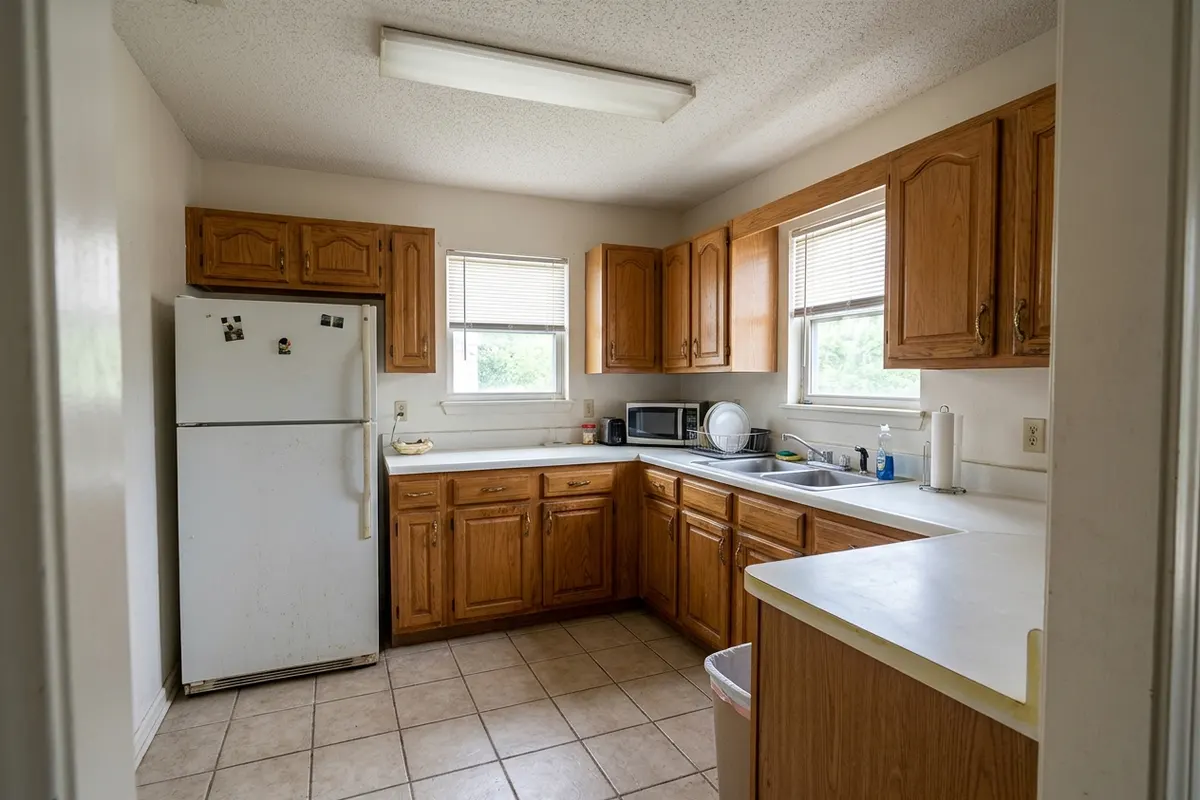
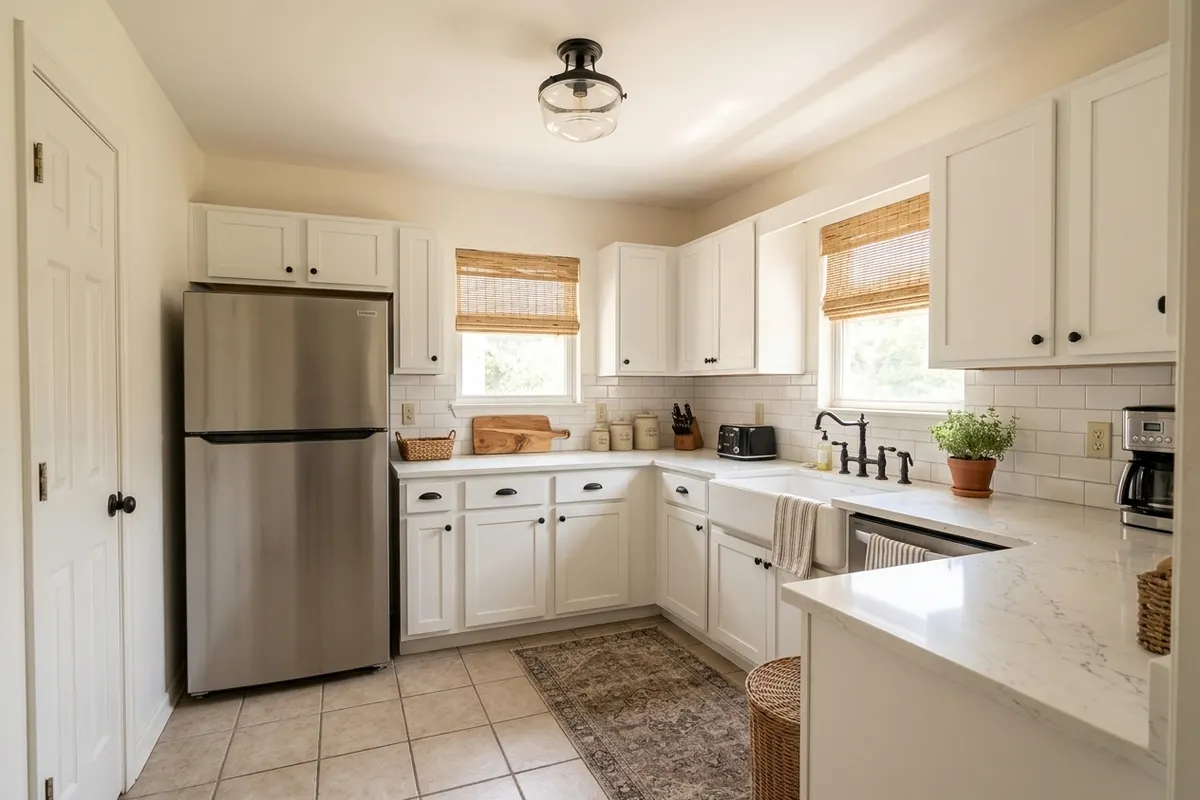
Kitchen
Modern FarmhouseWhite shaker cabinets, warm wood accents, and matte black hardware refresh a dated kitchen.
 Before
 After
Dining Room
Mid-Century ModernA walnut dining table, mustard chairs, and a sculptural pendant anchor the room.
 Before
 After
Home Office
IndustrialExposed brick, reclaimed wood, and black steel turn a spare room into a focused workspace.
 Before
 After
Outdoor / Patio
MediterraneanTerracotta planters, whitewashed walls, and olive trees turn a bare patio into a sunlit terrace.
How to Use Our AI Room Design Generator in 3 Steps
No interior design experience needed. Just start with one snapshot of your space.
- 01Add your room image
Drag and drop a photo or click to upload. We support JPG, PNG, and WebP files up to 20 MB. Photo stuck on your phone? Scan the QR code to send it straight over. For the best AI room design results, use a clear, well-lit shot that captures most of the space.
- 02Pick a room type and style
Select your room type and choose an interior style from the list. Want to tweak the details? Add a quick note like "keep the fireplace" or "swap in a dark green sofa," or switch to Custom mode to describe the entire redesign yourself.
- 03Generate and download
Hit Generate and get a photorealistic AI room design in seconds. Download the image to share with family, bring to your contractor, or keep handy while shopping for furniture.
Key Features of AI Room Design
Use our AI room design generator to preview a new style before you spend a dollar on paint, furniture, or tiles.
Try it free, no sign-up
Drop in an image and hit Generate. No account, no email, and no credit card required. You can try AI room design free without login, so you can judge the quality for yourself before paying a cent. Everything runs right in your browser, with nothing to download or install.
Try Room Design AI
Keeps your room's layout
You want to see your own space, not a generic showroom. This AI room planner preserves your walls, windows, doors, ceiling height, and camera angle, updating only the furniture, decor, colors, materials, and lighting. So every idea actually fits your real room.
Try Room Design AI
Ready in seconds
Hiring a designer means waiting days or weeks for a first concept. With AI Room Design, you get a fresh direction in seconds. Not quite right? Switch styles and run it again. You can compare five or six completely different looks over a single cup of coffee until one clicks.
Try Room Design AI
Dozens of AI room design styles
Choose from Modern, Japandi, Scandinavian, Industrial, Boho, Coastal, Farmhouse, Art Deco, Quiet Luxury, and more. Each preset pairs coordinated furniture, palettes, and textures so the room feels cohesive from floor to ceiling. Want something more specific? Switch to Custom mode, type what you're picturing (like "a green velvet sofa and oak shelves"), and AI Room Design will generate it from your prompt.
Try Room Design AI
Photorealistic results
Every AI room design renders like a real photograph, not a flat sketch or a 3D cartoon. Shadows fall naturally across the floor, and textures like oak, marble, and linen hold up at a closer look. Seeing your space this clearly makes it much easier to picture living there and decide what to tackle first.
Try Room Design AI
Your photos stay private
Your home is personal, and we treat it that way. Uploaded photos and generated results stay private to your account. We never publish them or feature them in our gallery. Whenever you want to revisit an idea, your entire AI room design history is saved in one place.
Try Room Design AI
AI Room Design FAQ
What is AI room design?
AI room design lets you preview your space in a new style before you commit to a remodel or buy new furniture. Start with a picture of your current space, choose an interior style (or write your own prompt), and our AI room design generator reimagines the space with updated decor, finishes, and lighting. It is a fast, low-risk way to test ideas before spending money.
Is AI Room Design free to use?
Yes. You can try AI room design free without login right in your browser. If you want to create more designs, you can upgrade anytime.
Will AI Room Design keep my room's layout?
Yes. It preserves your existing room structure, including walls, windows, doors, ceiling lines, and camera perspective, while restyling the furniture, surfaces, and lighting. Keep in mind that an AI room design is a visual concept rather than a measured blueprint, so always double-check furniture dimensions before ordering anything.
Which rooms can I redesign?
Our AI room planner works across almost every indoor and outdoor space: living rooms, bedrooms, kitchens, bathrooms, dining rooms, home offices, kids' rooms, and patios. Just select the matching room type before you generate so the furniture and layout suggestions fit the space.
What kind of photo works best?
Start with a sharp, well-lit photo taken from a corner or doorway so most of the room is visible. Hold your phone level, and avoid ultra-wide distortion, heavy filters, or people in the shot. Clutter is totally fine. A clean starting photo simply gives you a more realistic AI room design.
Can I describe my own design?
Yes. Switch to Custom mode and describe what you want in your own words, like "a bright kids' room with a bunk bed and built-in storage." The AI keeps your room's architecture intact and rebuilds the decor around your prompt.
What happens if a generation fails?
Occasionally a render can fail during peak traffic. If that happens, your credits are refunded automatically, so you never pay for a failed result. Just hit Generate to try again. If the issue persists, try a different photo or email us at support@airoomdesign.me.
Are my uploaded photos safe and private?
Yes. Your photos are kept private and used only to create your redesigns. We never publish them or feature them in our gallery, and you can delete your AI Room Design history at any time.
Do I need to download an app to use AI Room Design?
No. AI Room Design works directly in your web browser on desktop, mobile, and tablet, so there is nothing to download or install. Just open the site, add your room image, and start designing.
Try AI Room Design Free Today
Drop in a picture of your space and see it transformed in seconds. No sign-up required.